Ads.
Rewarded videos, verified on the server.
Viewers can watch a rewarded video to unlock one episode or get bonus coins. The reward is granted only when AdMob's signed server-side verification callback reaches your server. Interstitials between episodes are available and off by default.
01Set up rewarded ads
- AdMob → Apps: add your iOS and Android apps and create a Rewarded ad unit for each.
- Replace Google's test app ids in
AndroidManifest.xmlandInfo.plistwith your own (where). - In each rewarded ad unit → Server-side verification, set the callback URL
https://<your domain>/api/ads/admob/ssv. - Console → Rewarded ads: paste both rewarded unit ids, choose what an ad gives (unlocks the episode, bonus coins, or the viewer's choice), bonus coins per ad (default 10) and ads per viewer per day (default 5), then turn Rewarded ads on.
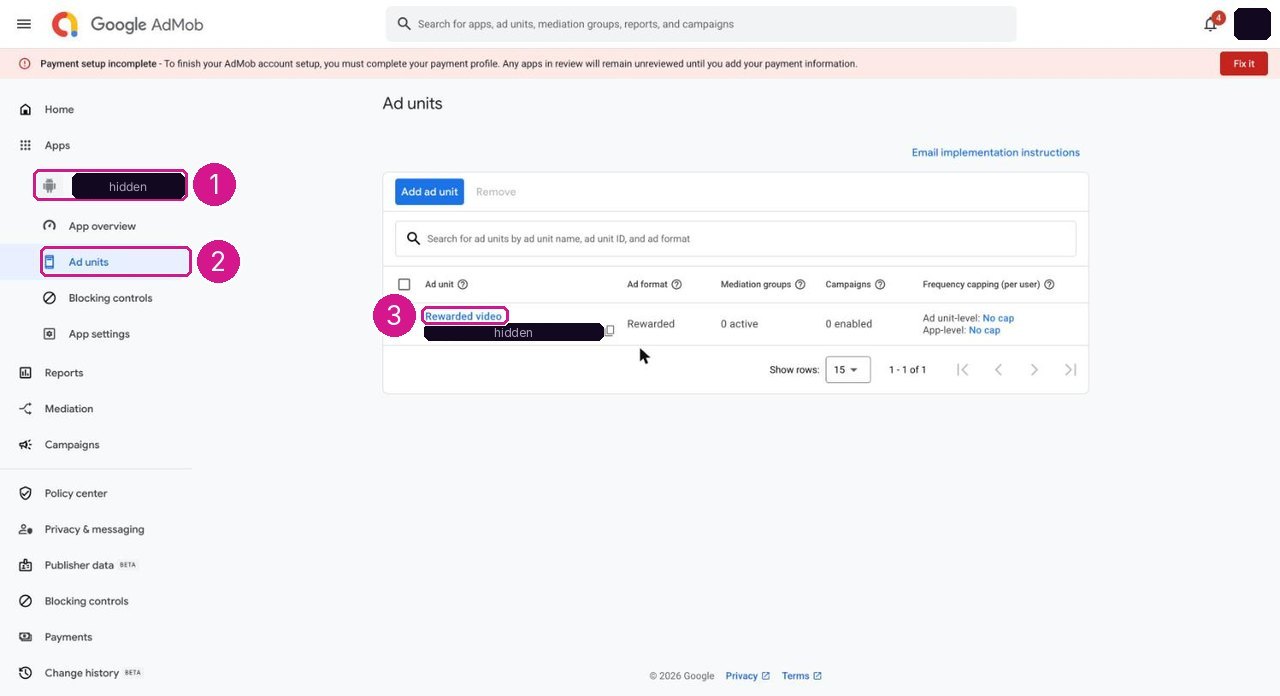
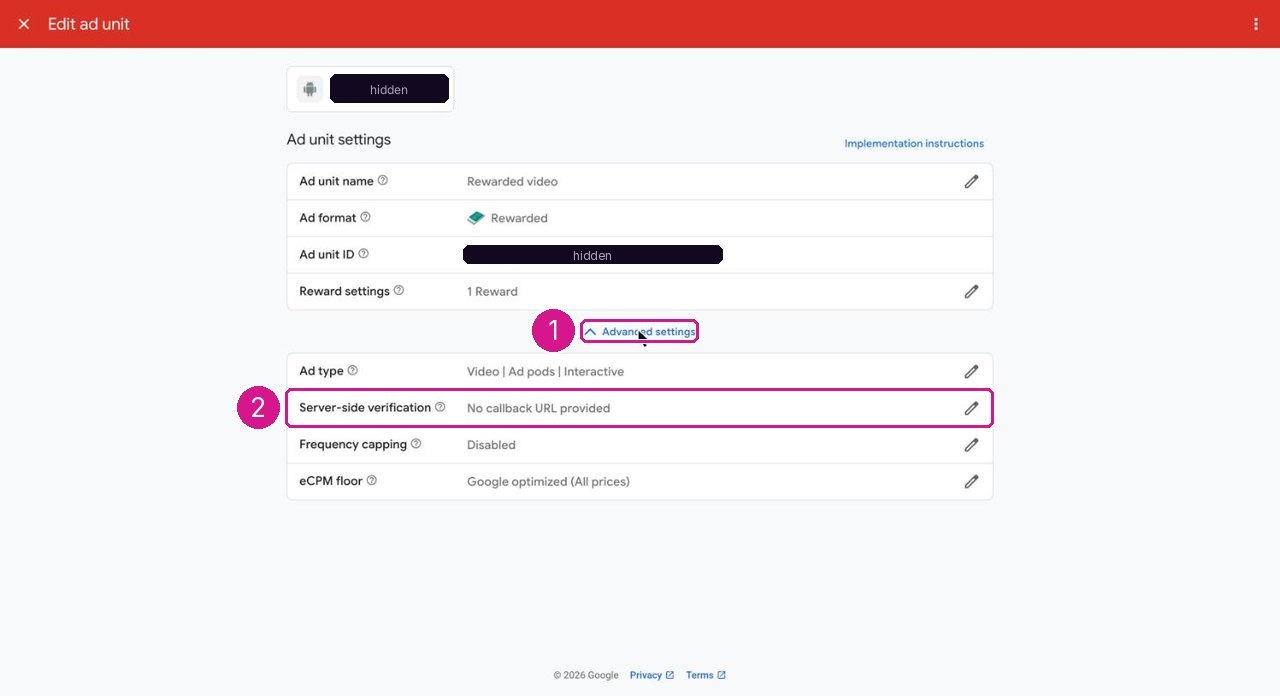
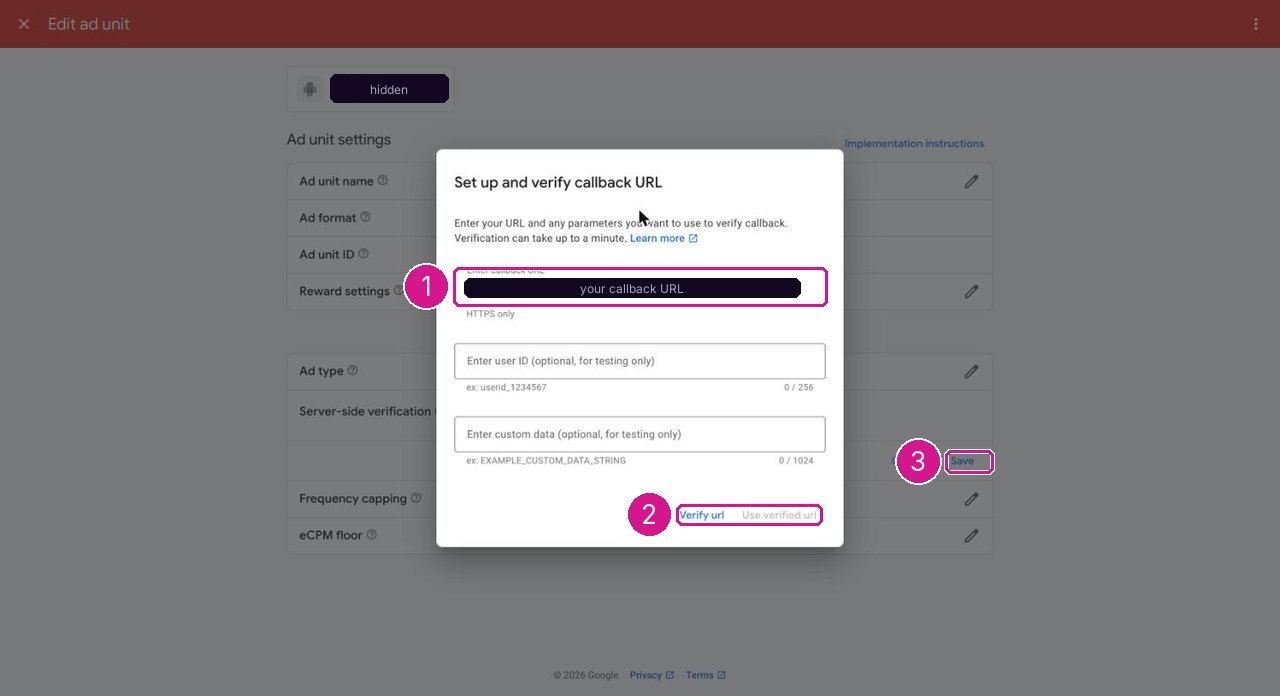
https://<your domain>/api/ads/admob/ssv, (2) Verify url, then Use verified url, (3) Save. The value in the capture is hidden; use your own domain.Before a store release, sh tool/check_release.sh in app/ lists any Google sample AdMob app id that is still in Info.plist or AndroidManifest.xml (release check).
02How a reward is granted
The app asks the server for an ad session and passes the session nonce to the ad SDK as SSV custom data. When the viewer finishes the ad, Google calls your server; the server checks the signature against Google's published keys, accepts each transaction once and only then credits the reward. The app waits for that confirmation. Nothing is credited on the device.
On a demo server (DEMO_MODE=true) a clearly labelled sample ad replaces the ad network; it is never shown in production.
03Interstitials between episodes (optional)
Console → Rewarded ads → Interstitial ad after every N episodes (0 = never, the default) and the interstitial unit ids for Android and iOS. VIP members never see them, and the demo server never shows them.
04VIP and ads
No ads for VIP members is on by default. VIP passes are sold in the store (Payments).
05What this costs you
AdMob charges nothing to use. Google pays you ad revenue after its own share, into the payment profile of your AdMob account, once your balance passes Google's payment threshold; new apps can show limited ads until AdMob has reviewed them. See Google's AdMob payment help pages and Costs not included.
06Privacy and store forms
AdMob collects device data for advertising. Declare it in the App Store privacy details and the Google Play Data safety form, and follow Google's consent requirements for the countries you serve (for example the EEA and UK). The package does not include a consent dialog; add one with Google's User Messaging Platform if your markets need it.